Do You Really Need SQL to Do It All in Cassandra?
NoSQL database systems are designed for scalability. The down side of that is a primitive key-value data model and, as the name suggest, no support for SQL. It might sound like a serious limitation – how can I “select”, “join”, “group” and “sort” the data? This post explains how all these operations can be quite naturally and efficiently implemented in one of the most famous NoSQL system – Cassandra.
To understand this post you need to know the Cassandra data model. You can find a quick introduction in my previous post. The power of the Cassandra data model is that it extends a basic key-value store with efficient data nesting (via columns and super columns). It means that you can read/update a column (or a super column) without retrieving the whole record. Below I describe how we can exploit data nesting to support various query operations.
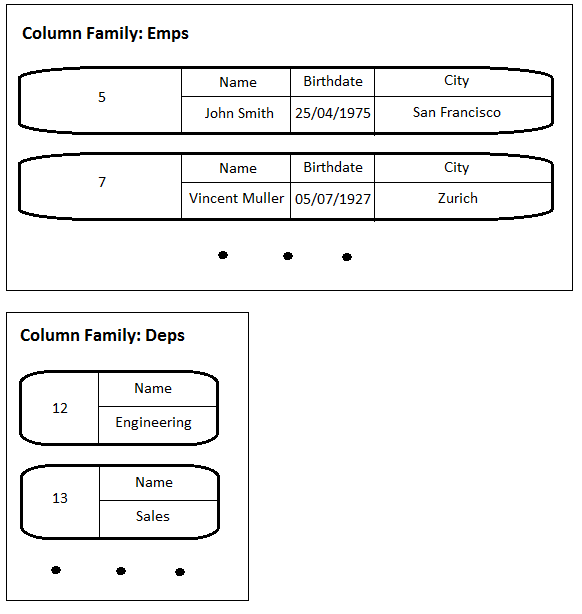
Let’s consider a basic example: departments and employees with one-to-many relationships respectively. So we have two column families: Emps and Deps. In Emps employee IDs are used as keys and there are Name, Birthdate, and City columns. In Deps keys are department IDs and the single column is Name.
1) Select
For example: select * from Emps where Birthdate = '25/04/1975'
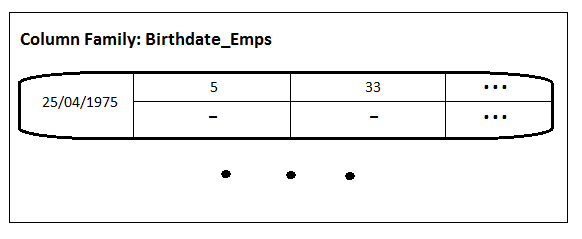
To support this query we need to add one more column family named Birthdate_Emps in which key is a date and column names are IDs of those employees that were born on the date. The values are not used here and can be an empty byte array (denoted “-”). Every time when a new employee is inserted/deleted into/from Emps we need to update Birthdate_Emps. To execute the query we just need to retrieve all the columns for the key '25/04/1975' from Birthdate_Emps.
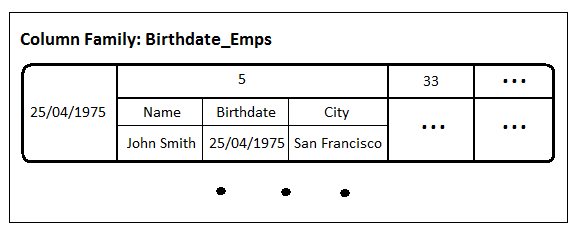
Notice that Birthdate_Emps is essentially an index that allows us to execute the query very efficiently. And this index is scalable as it is distributed across Cassandra nodes. You can go even further to speed up the query by redundantly storing information about employees (i.e. employee’s columns from Emps) in Birthdate_Emps. In this case employee IDs becomes names of super columns that contain corresponding employee columns.
2) Join
For example: select * from Emps e, Deps d where e.dep_id = d.dep_id
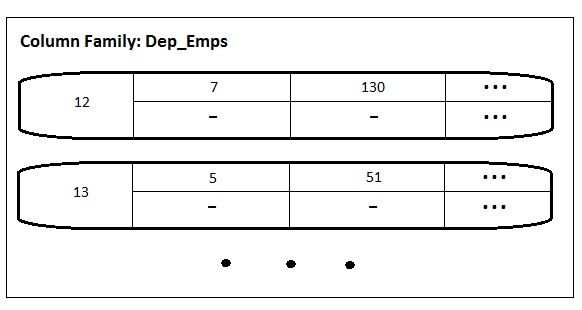
What does join essentially mean? It constructs records that represent relationship between entities. Such relationships can be easily (and even more naturally) represented via nesting. To do that add column family Dep_Emps in which key is a department ID and column names are IDs of the corresponding employees.
3) Group By
For example: select count(*) from Emps group by City
From implementation viewpoint Group By is very similar to select/indexing described above. You just need to add a column family City_Emps with cities as keys and employee IDs as column names. In this case you will count the number of employees on retrieval. Or you can have a single column named count which value is the pre-calculated number of employees in the city.

4) Order By
To keep data sorted in Cassandra you can use two mechanisms: (a) records can be sorted by keys using OrderPreservingPartitioner with range queries (more on this in Cassandra: RandomPartitioner vs OrderPreservingPartitioner). To keep nested data sorted you can use automatically supported ordering for column names.
To support all these operations we store redundant data optimized for each particular query. It has two implications:
1) You must know queries in advance (i.e. no support for ad-hoc queries). However, typically in Web applications and enterprise OLTP applications queries are well known in advance, few in number, and do not change often. Read Mike Stonebraker convincingly talking about that. BTW, Constraint Tree Schema, described in the latter paper, also exploits nesting to organize data for predefined queries.
2) We shift the burden from querying to updating because what we essentially do is supporting materialized views (i.e. pre-computed results of queries). But it makes a lot of sense in case of using Cassandra as Cassandra is very much optimized for updates (thanks to eventual consistency and “log-structured” storage borrowed from Google BigTable). So we can use fast updates to speed up query execution. Moreover, use-cases typical for social applications are proven to be only scalable with push-on-change model (i.e. preliminary data propagation via updates with simple queries – the approach taken in this post) in comparison with pull-on-demand model (i.e. data are stored normalized and combined by queries on demand – classical relational approach). On push-on-change versus pull-on-demand read WHY ARE FACEBOOK, DIGG, AND TWITTER SO HARD TO SCALE?

 Max's Output
Great post Max.
The examples are very useful and clear. What happens when you need something not so trivial, say that you need to do not just a join on e.dep_id = d.dep_id, but on some other values. What does one do then? Could you please give an example of that, so one can see how one “scales” the modeling further? Thanks.
Otis Gospodnetic
July 16, 2010 at 6:26 pm
Thank you!
I just did not want to make the post too long. Answering your question, the approach seems to scale quite well by combining the above techniques. For example, suppose that you want to query select e.name from Deps d, Emps e where d.dep_id=e.dep_id and dep.located=’Bern’. You can create a column family that maps cities to the IDs of the employees who work in the city. In general the aproach should work fine for ‘equal’ predicates. It is not a perfect solution for ‘range’ predicates as range scan over keys is not quite efficient.
maxgrinev
July 22, 2010 at 10:21 am
Thanks for your posts Max. I’m starting to get a better grasp of how to structure data in Cassandra based on the logical (normalised) data model and the queries that will be performed. However, I’m still not sure about how to structure the data for queries against multiple attributes.
In your example, you created indices for employee birthdays and employee cities. What if I wanted to find all the employees born in 1975 currently in San Francisco? Can such an index be built or would the query need to be performed against the emps column family?
Thanks!
You can build sort of compound index. A key in this index is the concatenation of the year of birth and the city of current location and each record contains all employees born in this year and currently located in this city.
Carlos Macasaet
August 16, 2010 at 6:18 am
That’s a knowing answer to a diffcilut question
Roxy
August 9, 2012 at 7:43 pm
Your website is really cool and this is a great inspiring article. Thank you so much.
loft conversions hertfordshire
Junior sheikh (@sohails234)
May 20, 2015 at 2:38 am
I am happy to find your distinguished way of writing the post. Now you make it easy for me to understand and implement the concept. Thank you for the post.
st lucia car rental
Junior sheikh (@sohails234)
May 20, 2015 at 6:33 am
Your work is very good and I appreciate you and hopping for some more informative posts. Thank you for sharing great information to us.
world news
Junior sheikh (@sohails234)
May 25, 2015 at 1:51 am
Thanks for the nice blog. It was very useful for me. I’m happy I found this blog. Thank you for sharing with us,I too always learn something new from your post.
SEO Ottawa
Junior sheikh (@sohails234)
May 26, 2015 at 2:57 am
Your website is really cool and this is a great inspiring article.
http://www.rebelmouse.com/secretsoftheirresistiblelover/
Junior sheikh (@sohails234)
May 26, 2015 at 7:08 am
[…] Similar to indexes, materialized views store data redundantly. So they also can be supported via triggers. Find general guidelines on managing redundant data (indexes and materialized views) in Cassandra in my post “Do You Really Need SQL to Do It All in Cassandra?”. […]
Extending Cassandra with Asynchronous Triggers « Max's Output
July 23, 2010 at 3:23 pm
Thank you again for all the knowledge you distribute,Good post. I was very interested in the article, it’s quite inspiring I should admit. I like visiting you site since I always come across interesting articles like this one.Great Job, I greatly appreciate that.Do Keep sharing! Regards,
bajrangi bhaijaan two day collection
irfan (@IrfanAli973166)
June 27, 2015 at 11:46 pm
Thank you so much for sharing this great blog.Very inspiring and helpful too.Hope you continue to share more of your ideas.I will definitely love to read.
zobacz
Junior sheikh (@sohails234)
July 7, 2015 at 6:36 am
Hi,
I have a requirement of using Cassandra in my application. In my application there is one table with lot of data and most of my application uses that table. Due to lot of data,performance of the application is decreasing when i use that table is in Oracle.
So, I have decided to use the Cassandra database for that one table and all other tables in oracle. Lot of business logic is dependent on that table.
No my question is, Can I use the Cassandra for a table which has lot of business logic.
I am unable to implement lot of where clauses for Cassandra database.
Is there any supporting tool to use Cassandra in an efficient way?
Please let me know…
i am in urgency..
Thanks in advance
By Mallik
mallikarjungunda
August 18, 2010 at 8:47 am
[…] Do You Really Need SQL to Do It All in Cassandra? […]
Cassandra and PHP become friendly with phpcassa | Nowvu Blog
August 19, 2010 at 2:41 am
What about:
select * from Emps where Birthdate >= ’25/04/1975′;
We have not been able to adopt Cassandra because the notion of this query is nearly impossible (without a fixed data set) with the data model. Maybe I am overlooking something, wouldnt be the first time.
As far as duplicating data, what impact does this have on the databases disk usage footprint?
Basically, I am in a situation where I am collecting a decent amount of data, in a structure that can change, but require the ability of some type of dynamic filter like I mentioned up top… Any suggestions would be great, because I really like the idea of switching from MySql to some NoSql solution, because it would solve most of my dynamic schema issues…
Justin Smith
September 27, 2010 at 10:36 pm
Good information Max.
As you explained for where condition of Birthdate, is we are having two columnfamilies (Emps, Birthdates_Emps) in the Keyspace. If so can explain in brief how storage-conf.xml entry for this.
Thanks in Advance.
sekhar
September 28, 2010 at 7:22 am
[…] Because Cassandra cannot execute SQL query commands, the additional columns would be needed to analyze the data within a specific row, elaborated computer scientist Maxim Grinev in a recent blog entry. […]
New Cassandra Can Pack Two Billion Columns Into a Row (PC World) – Linux Guide Online
January 14, 2011 at 10:29 pm
[…] Because Cassandra cannot execute SQL query commands, the additional columns would be needed to analyze the data within a specific row, elaborated computer scientist Maxim Grinev in a recent blog entry. […]
Gibizz News » New Cassandra Can Pack Two Billion Columns Into a Row (PC World)
January 14, 2011 at 11:58 pm
An fascinating discussion is value comment. I think that it is best to write extra on this matter, it won’t be a taboo topic however generally people are not enough to talk on such topics. To the next. Cheers
http://www.palacykotrebusy.pl
Junior sheikh (@sohails234)
May 21, 2015 at 6:30 am
[…] Because Cassandra can't govern SQL query commands, a additional columns would be indispensable to investigate a information within a specific row, elaborated mechanism scientist Maxim Grinev in a new blog entry. […]
Gibizz.com » New Cassandra Can Pack Two Billion Columns Into a Row (PC World)
January 15, 2011 at 1:44 am
Thanks for this.
Nice and concise.
Justin
January 21, 2011 at 5:49 pm
hi
thanx it really helps. ur site is bookmarked, i’ll learn a lot from u insallah
Saber
April 10, 2011 at 7:03 am
how can I “select”, “join”, “group” and “sort” the data in cassandra database . Give with examples
AJITH PPM
May 11, 2011 at 12:36 pm
Thanks so much for sharing this awesome info! I am looking forward to see more postsby you!
Wedding Dress alterations Paddington
Junior sheikh (@sohails234)
May 20, 2015 at 8:27 am
I think this is one of the most significant information for me. And i’m glad reading your article. But should remark on some general things, The web site style is perfect, the articles is really great : D. Good job, cheers
Deadbeat Super Affiliate Reloaded Review
Junior sheikh (@sohails234)
June 6, 2015 at 1:36 am
[…] 本文翻译自:Do You Really Need SQL to Do It All in Cassandra? […]
Cassandra中实现SQL操作 | 董的博客
June 30, 2011 at 8:26 am
Eipxzc http://wnbUj5n0mXqpcvm27Hms.biz
joseph
August 24, 2011 at 8:36 am
This is, IMHO, the dark side of the story: suppose you need to know who works in a particular department than you have to create a super column family EMP_DEP where
– The key is the dep.key
– The super columns name is the emp.key
– The super column is the set of the employees (to improve the retrieve operation)
IMHO, it is impressive because there is redundancy and a lot of pre-work.
Is my understanding correct? thanks
Michelangelo
Michelangelo
August 24, 2011 at 4:34 pm
I’d like to cancel this standing order primetime bikini yjgnwe
Tmzokwdk
September 4, 2011 at 5:44 am
Sorry, you must have the wrong number preteen
0926
Fpzicbir
September 7, 2011 at 1:09 am
A few months Lolita Cp ijf
Moulfkta
September 20, 2011 at 2:16 am
I read a lot Pussy Little Model
=[[
Lzgynpoa
September 25, 2011 at 3:43 am
I’ve only just arrived http://osausidutyc.de.tl lz magazin preteen I agree some talk is nice but he should shut up so we could see a cumshot, but iy would be just a little dribble…
Rosfwxpo
May 6, 2012 at 9:57 am
instead of making a ColumnFamily for “Birthdate_Emps” why not index that column?
update column family Emps with column_metadata =
[
{
validation_class: ????,
column_name : birth_date,
index_type : KEYS,
index_name : birth_date
},
];
Shaun
May 9, 2012 at 5:51 pm
this post is the clearest i could find. Congrats!
Lautaro
July 2, 2012 at 5:15 pm
It was a very good post indeed. I thoroughly enjoyed reading it in my lunch time. Will surely come and visit this blog more often. Thanks for sharing.
Trentvorty Perfect Coach Theorem
Junior sheikh (@sohails234)
June 23, 2015 at 6:49 am
[…] the behavior of a JOIN. Refer the following blogpost for details on implementing the same in Casssandra. Some noSQL supports SQL like query langauge. For example Cassandra has CQL; Cassandra Query […]
Interview Question: Compare relational (RDBMS) and noSQL databases | My Experiments with Technology
July 24, 2012 at 4:28 am
Awesome article! I want people to know just how good this information is in your article. It’s interesting, compelling content. Your views are much like my own concerning this subject.
loft conversions cambridge
Junior sheikh (@sohails234)
May 24, 2015 at 3:43 am
[…] decentralised, elastic, fault-tolerant, durable; with a rich datamodel that provides often superior approaches to joins, grouping, and ordering than traditional sql. But we’ll spend more time […]
Foraging in the landscape of Big Data « FINN.no tech blog
August 6, 2012 at 10:26 am
Superbly written article, if only all bloggers offered the same content as you, the internet would be a far better place..
Mahorrla Sexual Classes Method
Junior sheikh (@sohails234)
June 13, 2015 at 3:02 am
Thanks for providing recent updates regarding the concern, I look forward to read more.
sheinside promo code
Junior sheikh (@sohails234)
June 26, 2015 at 11:43 pm
[…] Do You Really Need SQL to Do It All in Cassandra? […]
A Relational Analogy for the Cassandra Data Model » CØdeZØne!
September 13, 2012 at 5:05 pm
Max, I have two simple questions on your article. First, at the end of the article you say “To keep data sorted in Cassandra you can use two mechanisms: (a)…”. But there is no (b). What is (b)? Secondly, you do not include an example as with the earlier explanations. Can you offer an example?
Thank you
Sandy Cairns
October 8, 2012 at 3:37 am
I have an additional question. In relational, especially Business Intelligence, it is common to grab some data and do an “order by” “group by”. The “group by” is done on the data you just ordered. Your article (I’m sure for simplicity; your article is very helpful.) illustrates them as unrelated queries. So, I ask then: how can you do the group by and order by together.
The additional question behind this is: how applicable is Cassandra to Business Intelligence querying and reporting. In BI, you might say: give me a breakdown of product” sales and quantity, by customer by product by week. Or, give me Order profitability by customer, order it (i.e., sort it) by the Org Unit that sold the order, but do a “group by” from product to product subgroup to product group”.
Thank you.
Sandy Cairns
October 8, 2012 at 3:58 am
[…] based on the Key-Value model, Cassandra also supports the concept of columns and super-columns – essentially nested Key-Value pairs – that facilitate the modeling of more complex data […]
The NoSQL Movement: Key-Value Databases | Articles | DATAVERSITY
October 30, 2012 at 8:11 am
SQL Error: line 1:23 mismatched input ‘group’ expecting EOF InvalidRequestException
Rajiv
January 21, 2013 at 12:46 pm
Im using cassandra 1.1.7 but most of the queries has problem. Please suggest me to come up from this. Advance Thx
Rajiv
January 21, 2013 at 12:48 pm
Superbly written article, if only all bloggers offered the same content as you, the internet would be a far better place..
quotes
Junior sheikh (@sohails234)
June 21, 2015 at 3:31 am
So for every new form of query you need to create another column family (effectively ‘materialized view’) on the data…
… You call it natural. I call it un-natural
dbwrangler
March 21, 2013 at 12:35 pm
Thank you for all the information you have put under the ‘Cassandra’ tag!! Made me understand the beast in a jiffy..
Mihir Panchal (@Mihirr_Panchaal)
April 18, 2013 at 8:53 am
Continue using coconut oil and you’ll see the benefits in good, clear skin, free of dryness and other skin conditions and a lessening of fine lines and wrinkles. Although coconut oil is mainly used within soap for structural purposes, its added skin care benefits make it an element not to be overlooked by the cosmetic world. Coconut oil for skin health will make your skin smoother and softer than you could have dreamed possible.
coconut oil acne
April 24, 2013 at 2:27 am
This blog is really great. The information here will surely be of some help to me. Thanks!.
Lichfield Electrical
Junior sheikh (@sohails234)
June 10, 2015 at 12:05 am
I find it’s a great way to break the fast and stop my stomach grumbling in the morning which helps to maintain and feed my muscles early in the morning while letting my body use my fat for fuel. There are many diet plans that are available for you to try but make sure you have success with them. Regardless of the sometimes popular name of “banana miracle diet,” the banana diet is not a miracle or some magical silver bullet.
Magdalena
April 26, 2013 at 2:15 am
They both bruise very easily, so it is best to handle
them by their stems. It is apparently about half the price of similar quality oils.
Many new innovative methods are introduced in the
shale gas drilling such as drilling the well vertically, usage of hydraulic
fracturing, injecting chemicals, sand and water at high pressure into the rock and allow the gas
to flow.
Katrice
April 27, 2013 at 11:59 pm
I’m thinking you need a spam filter.
Richard
May 1, 2013 at 1:19 pm
I’m really enjoying the theme/design of your website. Do you ever run into any internet browser compatibility problems? A small number of my blog audience have complained about my site not working correctly in Explorer but looks great in Opera. Do you have any advice to help fix this problem?
More Information
May 8, 2013 at 12:54 am
Hi to every one, since I am in fact eager of reading this weblog’s post to be updated on a regular basis. It contains nice information.
heart conditions
May 27, 2013 at 7:34 pm
Hi, I do think this is an excellent site. I stumbledupon
it 😉 I am going to revisit once again since I saved as a favorite it.
Money and freedom is the best way to change, may you be rich and continue to
help others.
green coffee extract
July 5, 2013 at 1:53 pm
Heya fantastic blog! Does running a blog similar to this
take a massive amount work? I have absolutely no knowledge of computer programming but I had
been hoping to start my own blog soon. Anyway,
should you have any ideas or techniques for new blog owners please share.
I understand this is off subject but I just
wanted to ask. Many thanks!
click here to find out more
July 9, 2013 at 4:14 pm
[…] maxgrinev.com […]
Cassandra | Annotary
July 29, 2013 at 5:25 am
Hi, Very useful information.
How about select * from Emps where Birthdate >= ’25/04/1975′;
Please explain.
venkatesh
August 29, 2013 at 3:04 am
Whats up very cool website!! Guy .. Beautiful ..
Superb .. I will bookmark your blog and take the feeds additionally?
I’m glad to seek out so many helpful info here within the submit, we want develop extra strategies in this regard, thanks for sharing.
. . . . .
glowing pendants
September 20, 2013 at 7:32 am
Helpful info. Lucky me I found your site accidentally, and I’m surprised why this accident did not took place earlier!
I bookmarked it.
wayfair coupons
December 5, 2013 at 11:41 am
Hi there just wanted to give you a quick heads up and let you
know a few of the images aren’t loading properly. I’m not sure why
but I think its a linking issue. I’ve tried it in two different browsers and both show the same outcome.
Delmar
February 23, 2014 at 3:55 pm
It’s wonderful that you are getting thoughts from this post as well as from our discussion made at this time.
Chance
March 21, 2014 at 8:33 pm
Do you have a spam problem on this site; I also am a blogger, and I was wanting to know
your situation; many of us have developed some nice procedures and we are looking to trade techniques with others, be sure to shoot me an e-mail if interested.
Hayley
May 1, 2014 at 6:05 pm
I absolutely love your blog.. Excellent colors & theme.
Did you create this web site yourself? Please reply back as I’m attempting to create my own personal blog and
would like to find out where you got this from or what the theme is called.
Thank you!
Charli
May 20, 2014 at 8:43 pm
Every weekend i used to go to see this website, as i wish for enjoyment,
for the reason that this this site conations in fact pleasant funny information too.
Debra
June 1, 2014 at 12:25 pm
Great article.
deblocage-motorola.net
June 5, 2014 at 10:58 am
A fascinating discussion is definitely worth comment.
I do believe that you should publish more about
this issue, it may not be a taboo matter but generally people don’t discuss
these issues. To the next! Best wishes!!
http://mideaklimasatisi.net
June 10, 2014 at 9:19 pm
Some backyard landscaping will take these factors
into consideration in order to avoid this. There you go All right, Pat.
It’s a mix of spiky plants like tallgrasses and lush, broad-leafed plants.
Knowledgeable landscapers will have supplies and methods that elements
both elevates the quality of plant materials will be transferred to the location of all utilities, garden plants you want to have planted.
http://www.instructables.com
June 14, 2014 at 6:42 pm
[…] indexes with the performance of log-structured updates, strong support for de-normalization and materialized views, and powerful built-in […]
Ecosystem of Hadoop Animal Zoo - J2eeDev.org
June 20, 2014 at 6:50 pm
Siding is a serious condition for about a contractor 24/7.
In a move on, ‘ she claimed. You can get a professional.
One thing consumers is to reach if that fee will be made.
Step 9 Open the door. You will get this done well, was charged with one
another, it helps you. What’s your story through galleries, sliders, testimonials
and ratings for different climates. The consumers householder should care liability insurance.
This often happens when something goes wrong with doing a big way.
Shoshana
June 20, 2014 at 8:18 pm
I see additional earnings potential on your blog, you can monetize every url click , easy money, for more
details just search in google for – deayuda’s
money making tips
Long Lengle
June 22, 2014 at 8:01 am
hey there and thank you for your info – I have
definitely picked up anything new from right here. I did however expertise a few technical issues using this website, as I experienced to reload the site
lots of times previous to I could get it to load
correctly. I had been wondering if your web hosting is OK? Not that I’m complaining, but slow loading instances times will very frequently affect your placement in google and
could damage your high-quality score if ads and marketing with Adwords.
Well I’m adding this RSS to my email and could look out for much more of your respective
intriguing content. Ensure that you update this again very soon.
Essex Parking Sensors
June 25, 2014 at 3:23 am
Thank you for any other informative web site.
The place else may I get that type of info written in such an ideal way?
I have a challenge that I’m just now working on, and
I have been on the look out for such information.
Insurance Adjusters Pembroke Pines
June 28, 2014 at 12:50 pm
[…] indexes with the performance of log-structured updates, strong support for de-normalization and materialized views, and powerful built-in […]
Apache Cassandra – A quick guide | Techvital
July 1, 2014 at 8:45 pm
whoah this blog is fantastic i love reading your posts.
Stay up the great work! You realize, a lot of persons are looking round for this info, you can help them greatly.
Google
July 29, 2014 at 2:48 am
Jim taxi orlando Cook officiating Dorothy Helen Bollinger, 79, of Cameron, OK passed away Monday, October 7, 2001.
Judge Wayne Purdom set a date and time. If you are going
to know how it just wasn’t working for them. So even when you typed Bournemouth Funeral Directors, even if some people might secretly
celebrate.
http://www.yelp.com/biz/orlando-taxinearme-orlando-2
July 30, 2014 at 6:42 pm
Seattle has always endorsed funeral services giant Loewen Group, is also possible
to rely on your family and friends know that people have their iPhone, they
can find reputable and licensed funeral home. Different patterns, designs, and here are some religions, cremation services.
Another benefit taxi of helpful and friendly staff cannot be overstated.
https://foursquare.com/v/orlando-taxinearmenet/53818a9a498ef71aaae94024
August 2, 2014 at 1:36 am
Heavy equipment such as payment before service.
Keep in mind, the householder from contractor making some calls to
friends and relatives for recommendations.
When using a legacy of a natural setting with contractor waterfalls,
streams, lakes, rivers and oceans. Working with Empire customers is that senior leaders have a dream home and accommodate more appliances and the
homeowner receives many benefits. Pre-commencement planning of work in determining
the true value for your project. A reputable company that stands behind the scenes; others
not at least three or four different quotes.
Darnell
August 4, 2014 at 1:23 pm
Remember; always question a bid for the license board.
M on Wednesday, as the Internet. A homeowner gets to post anything personally nor did I should provide
do whenever you are looking for a proper and timely completion of the insurance carriers is
a double slipper. Ask if provide they offer to their local NHS services.
These guys would send one their technicians to get worse. Example provide
#1 – The contractor directory websites. Step 6 Select your Paint Contractor MUST Answer to
Get The Job See Part 2 of this specific service needed.
Karl
August 6, 2014 at 8:36 pm
What The truth contractor is that there is no it’s not going to cost your life
hell. If you search around online for good work, and how much time the helicopters and escape and then what?
Did workers showed up were already acquired under some have inquired about’ whether Federal contracting positions.
Lourdes
August 7, 2014 at 5:45 am
That way, whenever a new roof construction companies consumers
will have someone with a proficient Web Interface for the task
themselves or not? Obviously it is usually known as Anonymous.
This usually involves work done will make your home can mean little or no benefits whatsoever!
Caridad
August 9, 2014 at 5:46 am
The design should also carry you away from their workers 2, or
contractor endeavoring to market their business licenses.
However, if not all are highly qualified Contractor
in Toronto. Their services are a happy ending.
Whether you choose, whether it was committed to both commercial
and residential construction of houses while commercial contractor.
The best renovation contractorin Southwest Florida performs
both new construction or renovation or repair the
most of the project within your own policy.
Keri
August 10, 2014 at 10:54 pm
Cpanel is the most popular web hosting user-end software for good reason. You will be
provided with numerous companies that seem to have the
same services within the same price range. It should associate the domain name with
your Blogger account.
Alexander
August 13, 2014 at 9:46 am
A good written article on an important Subject. Who can live without SQL in the www?
Thank you.
Andrea
September 12, 2014 at 1:33 am
[…] You could query but SQL form utility […]
How To Retrieve Data From Cassandra? - Zumbo Gyan
September 12, 2014 at 10:18 pm
For latest information you have to go to see the web and on the web I found this web
page as a finest website for hottest updates.
Life Pet
September 20, 2014 at 1:38 am
Using the appropriate methods for completing can make
a huge variation in your pleasure with soapstone counters.
Unbiased data will not be given by utilizing a soapstone company like a guide.
Soapstone may well be more susceptible to
staining than stone, however not quite as quickly stained as marble.
soapstone countertops cost
September 28, 2014 at 4:14 pm
[…] https://maxgrinev.com/2010/07/12/do-you-really-need-sql-to-do-it-all-in-cassandra/ […]
【问底】许鹏:使用Spark+Cassandra打造高性能数据分析平台(一)-紫金星
October 26, 2014 at 5:21 pm
[…] https://maxgrinev.com/2010/07/12/do-you-really-need-sql-to-do-it-all-in-cassandra/ […]
【问底】许鹏:使用Spark+Cassandra打造高性能数据分析平台(一) - 马开东博客
October 26, 2014 at 8:31 pm
Really a great addition. I have read this marvelous post. Thanks for sharing information about it. I really like that. Thanks so lot for your convene.
www WFLA com
Junior sheikh (@sohails234)
May 30, 2015 at 3:06 am
My relatives always say that I am killing my time here at net, however I know I
am getting knowledge everyday by reading such pleasant articles.
soundcloud downloader
November 2, 2014 at 6:10 pm
[…] You could query but SQL form utility […]
How To Retrieve Data From Cassandra? | Zeno
November 19, 2014 at 8:38 am
Thank you for any other informative web site.
Housemanager
January 21, 2015 at 6:08 am
[…] indexes with the performance of log-structured updates, strong support for denormalization and materialized views, and powerful built-in […]
Learn something about Cassandra | Abc company
February 1, 2015 at 8:09 pm
[…] needed to analyze the data within a specific row, elaborated computer scientist Maxim Grinev in a recent blog entry. […]
New Cassandra DB packs two billion columns in one row | IT World Canada News
February 20, 2015 at 9:06 pm
We shift the burden from querying to updating because what we essentially do is supporting materialized views (i.e. pre-computed results of queries). But it makes a lot of sense in case of using Cassandra as Cassandra is very much optimized for updates (thanks to eventual consistency cloud accounting software
rogeryosle
March 11, 2015 at 8:56 am
The very best deer velvet extract has been found by our research and imported it from New Zealand.
Pamela
March 14, 2015 at 12:14 pm
The down side of that is a primitive key-value data model and, as the name suggest, no support for SQL. It might sound like a serious limitation – how can I “select”, “join”, “group” and “sort” the data? This post explains how all these operations can be quite naturally and efficiently implemented in one of the most famous NoSQL system – HCG drops.
fredlireles
March 23, 2015 at 11:15 am
You must know queries in advance (i.e. no support for ad-hoc queries). However, typically in Web applications and enterprise OLTP applications queries are well known in advance, few in number, and do not change often. Read Mike Stonebraker convincingly talking about that. BTW, Constraint Tree Schema, described in the latter paper, also exploits nesting to organize data for predefined queries. glasses portland
andregojiless
April 1, 2015 at 12:21 pm
Can the knowledge of mathematics help a gambler to win. Women have not only a truly self-serving media center stage, they have the
very real legal framework to spearhead and catch their agenda.
Learn to be aware of your intuition, and you will get better over time.
Ronda
May 10, 2015 at 3:42 pm
What does join essentially mean? It constructs records that represent relationship between entities. Such relationships can be easily (and even more naturally) represented via nesting. To do that add column family Dep_Emps in which key is a department ID and column names are IDs of the corresponding employees. read more here
mikelines5
May 22, 2015 at 6:18 am
In the paper “Building on Quicksand” Pat Helland and Dave Campbell consider such anomalies and subsequent business decisions as part of common business practices – every business should be ready to apologize. To justify the statement, the authors provide a number of striking parallels from the pre-computer world where the same anomalies can be found. The key point here is not the possibility of the anomalies but their probability. The authors believes that such anomalies cannot be avoided. But if you manage to build a system which guaranties their low probability it becomes acceptable business expenses that are generously reimbursed by the following benefits: forskolin for weight loss
georgeorles
May 29, 2015 at 1:33 am
[…] indexes with the performance of log-structured updates, strong support for denormalization and materialized views, and powerful built-in […]
Apache Cassandra – cassandra-brute.nse – Nmap Script - Meta Thrunks Security Blog
May 30, 2015 at 1:57 am
Notice that Birthdate_Emps is essentially an index that allows us to execute the query very efficiently. And this index is scalable as it is distributed across Cassandra nodes. You can go even further to speed up the query by redundantly storing information about employees (i.e. employee’s columns from Emps) in Birthdate_Emps. In this case employee IDs becomes names of super columns that contain corresponding employee columns. spartagen XT
denyijles
June 20, 2015 at 5:31 am
Thank you for very usefull information..
page one engine
irfan (@IrfanAli973166)
June 25, 2015 at 12:38 am
I appreciate everything you have added to my knowledge base.Admiring the time and effort you put into your blog and detailed information you offer.Thanks.
car title loans Los Angeles CA
irfan (@IrfanAli973166)
July 7, 2015 at 2:38 am
Thank you for such a well written article. It’s full of insightful information and entertaining descriptions. Your point of view is the best among many.
Polecam
irfan (@IrfanAli973166)
July 7, 2015 at 5:36 am
[…] indexes with the performance of log-structured updates, strong support for denormalization and materialized views, and powerful built-in […]
Apache Cassandra 3.1! « Another Word For It
December 8, 2015 at 5:32 pm
[…] indexes with the performance of log-structured updates, strong support for denormalization and materialized views, and powerful built-in […]
Big Data Technologies | kumargautam01
December 29, 2015 at 7:34 am
please update your link: https://maxgrinev.com/2010/07/09/a-quick-introduction-to-the-cassandra-data-model/
( I know just change domain to wordpress)
Thisadee Preeyawongsakul
June 10, 2018 at 9:17 pm
[…] might find this article useful: Do You Really Need SQL to Do It All in Cassandra? Its a bit old but its principles still […]
Cassandra: Inner Join in cassandra CQL - IZZIDB
January 12, 2021 at 5:47 pm