A Quick Introduction to the Cassandra Data Model
Further reading: for an in-depth introduction see Understanding the Cassandra Data Model at datastax.com
For newcomers Cassandra data model is a mess. Even experienced database developers spend quite a bit of time learning it. There are great articles on the Web that explain the model. Read WTF is a SuperColumn? An Intro to the Cassandra Data Model and my favorite one – Installing and using Apache Cassandra With Java. This blog post is my take to explain Cassandra model to those who would like to understand the key ideas in 15 minutes or less.
In a nutshell, Cassandra data model can be described as follows:
1) Cassandra is based on a key-value model
A database consists of column families. A column family is a set of key-value pairs. I know the terminology is confusing but so far it is just basic key-value model. Drawing an analogy with relational databases, you can think about column family as table and a key-value pair as a record in a table.
2) Cassandra extends basic key-value model with two levels of nesting
At the first level the value of a record is in turn a sequence of key-value pairs. These nested key-value pairs are called columns where key is the name of the column. In other words you can say that a record in a column family has a key and consists of columns. This level of nesting is mandatory – a record must contain at least one column (so in the first point above value of a record was an intermediate notion as value is actually a sequence of columns).
At the second level, which is arbitrary, the value of a nested key-value pair can be a sequence of key-value pairs as well. When the second level of nesting is presented, outer key-value pairs are called super columns with key being the name of the super column and inner key-value pairs are called columns.
3) The names of both columns and super columns can be used in two ways: as names or as values (usually reference value).
First, names can play the role of attribute names. For example, the name of a column in a record about User can be Email. That is how we used to think about columns in relational databases.
Second, names can also be used to store values! For example, column names in a record which represent Blog can be identifiers of the posts of this blog and the corresponding column values are posts themselves. You can really use column (or super column) names to store some values because (a) theoretically there is no limitation on the number of columns (or super columns) for any given record and (b) names are byte arrays so that you can encode any value in it.
4) Columns and super columns are stored ordered by names.
You can specify sorting behavior by defining how Cassandra treats the names of (super) columns (recall that a name is just an byte array). Name can be treated as Bytes Type, Long Type, Ascii Type, UTF8 Type, Lexical UUID Type, Time UUID Type.
So now you know everything you need to know. Let’s consider an classical 🙂 example of Twitter database to demonstrate the points.
Column family Tweetscontains records representing tweets. The key of a record is of Time UUID type and generated when the tweet is received (we will use this feature in User_Timelines column family below). The records consist of columns (no super columns here). Columns simply represent attributes of tweets. So it is very similar to how one would store it in a relational database.
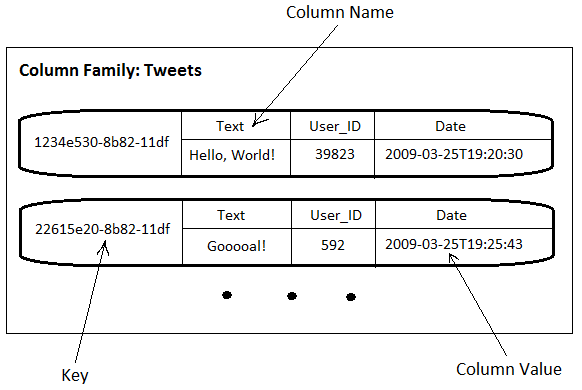
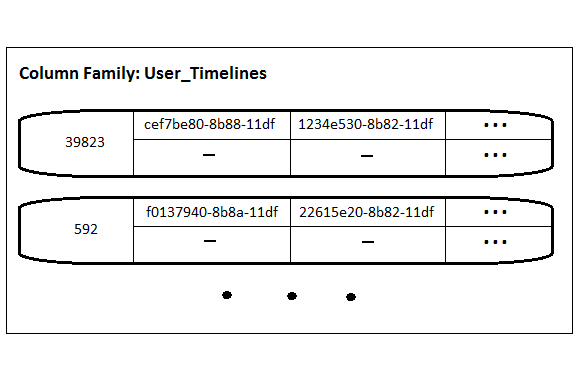
The next example is User_Timelines (i.e. tweets posted by a user). Records are keyed by user IDs (referenced by User_ID columns in Tweets column family). User_Timelines demonstrates how column names can be used to store values – tweet IDs in this case. The type of column names is defined as Time UUID. It means that tweets IDs are kept ordered by the time of posting. That is very useful as we usually want to show the last N tweets for a user. Values of all columns are set to an empty byte array (denoted “-“) as they are not used.
To demonstrate super columns let us assume that we want to collect statistics about URLs posted by each user. For that we need to group all the tweets posted by a user by URLs contained in the tweets. It can be stored using super columns as follows.
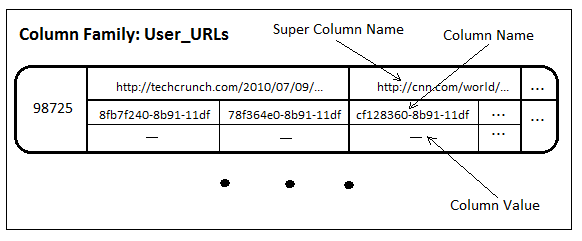
In User_URLs the names of the super columns are used to store URLs and the names of the nested columns are the corresponding tweet IDs.
Important note: currently Cassandra automatically supports indexes for column names but does not support indexes for the names of super columns. In our example it means that you cannot efficiently retrieve/update tweet ids by URL.
[Update: The above note is incorrect! It is subcolumn names that are not indexed inside super columns. Supercolumn names are always indexed. It is a great news as it enables the use-case of data denormalization to speed up queries. For more on this, find the first comment by Jonathan Ellis below. I cover denormalization use-cases in my next post.]
Let me know if I missed anything or something is unclear.

 Max's Output
Hi Maxim,
This is an excellent post!
A couple clarifications:
– if you don’t have anything relevant to store in the column value, leaving it an empty byte array is fine
– it is _subcolumn_ names that are not indexed inside supercolumns, meaning that you should only store data inside supercolumns that you plan to access together. In your example the supercolumns would be fine. Top level columns (the supercolumn’s name) are always indexed.
– The most common use case for supercolumns is for denormalizing data from another columnfamily, e.g. in user_timelines you could make the tweet id a supercolumn name, with subcolumns of the actual tweet field names + values. This makes reads still more efficient, since you don’t have to perform joins manually via multiget at read time.
Jonathan Ellis
July 13, 2010 at 3:25 am
Jonathan,
thanks for your feedback. I have fixed the post accordingly. It is very good news for me that I was wrong and supercolumn names are indexed! It is really useful for denormalization. And I have already covered this demormalization use-case in my next post https://maxgrinev.com/2010/07/12/do-you-really-need-sql-to-do-it-all-in-cassandra/
maxgrinev
July 13, 2010 at 12:43 pm
[…] A Quick Introduction to the Cassandra Data Model « Max’s Output – August 4th %(postalicious-tags)( tags: cassandra nosql data model tutorial database intro )% […]
Delicious Bookmarks for August 4th from 18:05 to 18:13 « Lâmôlabs
August 5, 2010 at 12:01 am
Since each record of User_URLs has a collection of super columns, does that make it a super column family? Or am I misunderstanding the distinction between column families and super column families?
Carlos Macasaet
August 16, 2010 at 5:31 am
Yes, you are right. It is a super column family.
maxgrinev
August 16, 2010 at 6:13 pm
Great post Maxim! Do you have the direct experience with using it in enterprise model?
Michael
September 8, 2010 at 2:19 pm
Not yet in enterprise settings. We are successfully using this approach for our Web/social applications.
maxgrinev
September 8, 2010 at 3:19 pm
[…] Page na Apache Tipos de Dados no Cassandra Introdução ao Modelo de Dados Cassandra Mais um tutorial sobre o modelo de dados […]
Introdução ao Apache Cassandra « blog do Zé
January 23, 2011 at 4:14 pm
[…] For quick introduction of Cassandra Data Model : Cassandra Data Model of Max Version […]
Cassandra Client « 玫瑰花茶的下午
April 4, 2011 at 4:10 pm
[…] besitzt ein relativ einfaches Datenmodell (siehe auch hier). Dies ist eine Mischung aus einem Key-Value-Store und einer spaltenorientierten Datenbank. Die […]
LinuxLife Blog - Artikel: Cassandra
October 20, 2011 at 2:54 pm
Great post! I’ve been trying to understand this model for a few weeks now.. Getting closer… much closer.
Tyson Hamilton (@tysonjh)
March 20, 2012 at 3:23 pm
[…] A Quick Introduction to the Cassandra Data Model […]
@tysonjh | Helpful Cassandra Links - @tysonjh
April 16, 2012 at 10:09 pm
Hi, I found your examples to be very helpful. What I’d really like to see is the way you created the schema and maybe even a few data insert examples that you’d do in cassandra-cli. So basically the CF creation syntax, and then a few inserts/gets for each example. Thanks!
Brett Nemeroff
May 4, 2012 at 3:32 pm
My programmer is trying to persuade me to move to .net from PHP.
I have always disliked the idea because of the costs. But he’s tryiong none the less. I’ve been using
WordPress on various websites for about a year and am concerned about switching to another platform.
I have heard fantastic things about blogengine.net. Is there a way I can import all my wordpress posts into it?
Any kind of help would be greatly appreciated!
Magda
August 10, 2012 at 6:34 pm
[…] So now that you have a basic understanding, I’d strongly suggest you to read the official explanation from Cassandra’s wiki and read other good explanations, e.g. A Quick Introduction to the Cassandra Data Model. […]
A Relational Analogy of the Cassandra Data Model » CØdeZØne!
September 12, 2012 at 7:19 am
[…] So now that you have a basic understanding, I’d strongly suggest you to read the official explanation from Cassandra’s wiki and read other good explanations, e.g. A Quick Introduction to the Cassandra Data Model. […]
A Relational Analogy for the Cassandra Data Model » CØdeZØne!
September 12, 2012 at 7:20 am
This is exactly what I was looking for. Thanks for sharing this great article! That is very interesting Smile I love reading and I am always searching for informative information like this!
veneers jupiter
January 26, 2015 at 12:30 pm
how to auto increment the row key value in cassandra database ?
Tejinder Singh
November 6, 2012 at 12:18 pm
You don’t. (That would require expensive cross-node coordination and hurt performance a great deal.) Use UUIDs instead.
Jonathan Ellis
November 7, 2012 at 6:04 pm
This link at the top: WTF is a SuperColumn? An Intro to the Cassandra Data Model
takes me to tumblr. I set up an account, but then I get: Access Denied. Do I need to join something else?
Michael Halpin
December 20, 2012 at 8:30 pm
Thank you a lot for providing individuals with remarkably superb chance to read critical reviews from this web site. It is usually so excellent and as well , full of amusement for me personally and my office fellow workers to search the blog particularly three times a week to see the newest tips you have. And definitely, I am always happy for the awesome advice served by you. Certain 4 tips in this posting are in reality the most beneficial we have had.
trading software india
January 9, 2013 at 11:19 am
Hello! Someone in my Facebook group shared this site with us so I came to
look it over. I’m definitely loving the information. I’m bookmarking
and will be tweeting this to my followers! Outstanding blog and great design.
male extender
May 13, 2013 at 11:01 am
I need to to thank you for this good read!! I absolutely enjoyed every little bit of it.
I have you book marked to look at new things you post…
xbox 360 console 4gb
June 20, 2013 at 3:46 am
A person essentially lend a hand to make critically articles
I might state. That is the very first time I frequented your web page
and so far? I amazed with the analysis you made to make
this actual submit extraordinary. Magnificent
activity!
low Carb Diet
July 11, 2013 at 3:45 am
[…] Intro to Cassandra data model […]
Cassandra Resources | SQL Rob
July 14, 2013 at 12:36 pm
Many headaches are a result from not enough water in the body.
Try and work out exactly what you need from your paleo diet supplements and
only aim to get what you actually, really need. If you discover that your doctor is not open minded about
dietary supplementation in general you may need to seek a second opinion.
visit the following internet page
July 21, 2013 at 2:01 am
It is really frustrating how this skin dilemma can totally
change how you look. This helps the slugging off of dead skin cells in
an accurate pace while being replaced by new healthy ones.
It’s rich in a number of important nutrients, including calcium, iron and potassium, but it also contains B-group vitamins, which soothe inflammation.
Naomi
July 21, 2013 at 7:31 am
However, if you are getting something made out of gold with diamonds
on it, you want to produce sure you’re getting top quality. He also made television appearances on shows including Crossfire and also the Capital Gang on CNN and became a frequent guest on these news programs. In 1992 Pat Buchanan ran inside the Republican primary for president over a platform of immigration reduction, social conservatism, and opposition to gay rights and abortion.
Rosalyn
July 27, 2013 at 2:10 am
Everything is very open with a precise explanation of the challenges.
It was really informative. Your site is very useful. Many thanks for
sharing!
games
November 27, 2013 at 9:34 pm
I will immediately seize your rss feed as I can’t find your email subscription link or newsletter service.
Do you’ve any? Please permit me know so that I
may just subscribe. Thanks.
sylwester 2014
December 5, 2013 at 11:47 am
Thank you for your clearly written explanations. Also the graphics you are using are very helpful to get a better overview. Actually I am still having a hard time with the super coloums. So I think I’ll read through your manual a second time, but later. Whenever my colleagues mentioned the Cassandra data model to me I thought it would take much more time to get used to it. But actually I think that it’s not that complicated after you learnt the basic structure. This article definitely helped me.
Mike
December 21, 2013 at 12:31 am
Even though today you can find out by making the investment into a search engine.
The list of search engine optimization tool that is popular among web marketers is Title Tag Checker.
In today’s World of Search, more and more sites are clambering to optimize their rankings in
websites and if you use keywords that are relevant
to new articles. The major benefits of all this hassle is that you will lose free website
search engine optimization everything.
St. Louis SEO Agency
March 31, 2014 at 7:22 am
Now I am going to do my breakfast, afterward having my breakfast coming again to read more news.
professional
April 6, 2014 at 5:03 pm
I loved as much as you will receive carried out right here.
The sketch is tasteful, your authored subject matter stylish.
nonetheless, you command get bought an edginess over that you wish be delivering the
following. unwell unquestionably come further formerly again since exactly
the same nearly very often inside case you shield this increase.
http://www.gamezebo.com
April 11, 2014 at 7:11 am
[…] a better understanding of Cassandra’s data model, refer to this article by Maxim […]
Getting Started with Apache Cassandra – My great WordPress blog
May 6, 2014 at 4:23 am
Remarkable things here. I’m very satisfied to peer your article.
Thanks a lot aand I am having a look aahead tto contact you.
Will yoou please drop me a mail?
rasing car game
May 16, 2014 at 9:07 am
Can you tell us more about this? I’d love to find out more details.
game of thrones season 3 episode 4
May 18, 2014 at 2:40 am
Hey there! This is my first visit to your blog!
We are a group of volunteers and starting a new
project in a community in the same niche. Your blog provided us beneficial information to work on. You have done
a extraordinary job!
game of thrones season 3
May 18, 2014 at 2:48 am
Admiring the time and energy you put into your
site and detailed information you present. It’s awesome to come across a blog every once in a while that
isn’t the same outdated rehashed information. Great read!
I’ve saved your site and I’m including your RSS feeds to my Google account.
Critical Bench Scam
May 20, 2014 at 2:14 am
I think what you posted was very reasonable. However, what
about this? what if you added a little content?
I am not saying your information is not good., but what if you added a post
title that makes people want more? I mean A Quick Introduction to the Cassandra Data Model | Max’s Output is
a little plain. You should peek at Yahoo’s home page and see how they create article headlines to get people to open the links.
You might add a related video or a related pic or two to get people interested about what you’ve written. Just my opinion,
it would bring your blog a little bit more interesting.
zasilacze
May 21, 2014 at 1:58 pm
Way cool! Some very valid points! I appreciate you penning
this article and the rest of the site is really good.
stalker film
May 21, 2014 at 8:37 pm
Thanks for your marvelous posting! I definitely enjoyed reading it, you will be a
great author. I will make sure to bookmark your blog and
definitely will come back very soon. I want to encourage one to continue your great job, have a nice weekend!
castle clash coins
May 23, 2014 at 8:19 pm
Pretty nice post. I just stumbled upon your weblog and wished to say
that I’ve really enjoyed surfing around your blog posts.
In any case I’ll be subscribing to your feed and
I hope you write again soon!
www
May 30, 2014 at 6:23 am
I do consider all the concepts you’ve introduced in your post.
They are very convincing and will certainly work. Nonetheless, the posts are very quick for beginners.
Could you please prolong them a little from next time?
Thanks for the post.
read more%u2026
June 3, 2014 at 5:08 pm
You’re so interesting! I do not suppose I have read anything like this before.
So good to discover somebody with some genuine thoughts on this subject.
Seriously.. many thanks for starting this up.
This web site is something that is required on the web, someone with a bit of
originality!
Linwood
June 12, 2014 at 9:04 am
If some one wishes to be updated with most recent technologies after that he must
be visit this website and be up to date all the time.
google.com
June 16, 2014 at 2:04 am
First of all I would like to say awesome blog! I had a quick question which I’d like to ask if you don’t
mind. I was curious to know how you center yourself and clear your mind
before writing. I have had difficulty clearing my mind in getting my thoughts out.
I do take pleasure in writing however it just seems like the first 10 to 15 minutes
are usually wasted simply just trying to figure
out how to begin. Any ideas or tips? Appreciate it!
Chinh sach gia vi cong dong!
June 16, 2014 at 6:45 am
I love what you guys tend to be up too. Such clever
work and coverage! Keep up the great works guys I’ve
you guys to my personal blogroll.
www
June 16, 2014 at 8:56 am
This website was… how do you say it? Relevant!! Finally I have found something which helped me.
Thanks!
cyfrowe
June 17, 2014 at 2:21 am
I love it whenever people get together and share ideas.
Great site, keep it up!
after effects wiggle Effect
June 20, 2014 at 8:05 am
This type of message always inspiring and High PR I prefer to read quality content, so happy to find good place to many here in the post, the writing is just great, thanks for the post.
Universal Life Church
April 15, 2015 at 3:35 pm
Hi there! This post could not be written any better!
Looking at this post reminds me of my previous roommate! He
continually kept preaching about this. I most certainly will send this information to him.
Pretty sure he’s going to have a very good read.
Many thanks for sharing!
how many states are there in the whole world
June 25, 2014 at 8:54 pm
For newest news you have to go to see world wide web and on the
web I found this web page as a most excellent website for most up-to-date updates.
Esperanza
June 26, 2014 at 6:14 am
My brother recommended I might like this web site. He was totally right.
This post actually made my day. You cann’t imagine simply how much time I had spent for this info!
Thanks!
บริษัททัวร์เกาหลี
June 28, 2014 at 9:40 pm
It’s difficult to find well-informed people on this
subject, however, you seem like you know what
you’re talking about! Thanks
Krystle
July 12, 2014 at 12:43 pm
What’s up, I log on to your blogs daily. Your humoristic style is witty,
keep up the good work!
jailbait
July 15, 2014 at 4:54 pm
I absolutely love your blog.. Great colors & theme. Did you
develop this web site yourself? Please reply back as I’m planning to create
my own website and would like to learn where
you got this from or exactly what the theme is called.
Cheers!
– cliquez ici
– cliquez ici
– cliquez ici
– cliquez ici
– cliquez ici
– cliquez ici
http://moourl.com/vo3dv
July 16, 2014 at 8:29 am
For a teen who would like to shop everyday buying virtual clothing is a
lot more affordable and I’m sure their parents won’t complain as much.
Send energy and zoning permits often, and hopefully your friends will reciprocate.
If enjoying in a very very casino you will need facebook poker chips for sale a wallet, or no under to pop
right down on the atm and withdraw some funds. City – Ville is Facebook and Zynga’s newest and most favored game up to now, attracting over 25 million players in the first month online.
Raise Wanted Level – PS3: R1, R1, Circle,
R2, Left, Right, Left, Right, Left, Right. Now that you just have the address, double select it plus it should now show up in the bottom portion of
Cheat Engine. The free game currently has numerous hooked onto it, and still is managing to
make profits.
Clash of Clans hile
July 23, 2014 at 1:09 am
super column is a matrix… that makes things easier
Ran
July 25, 2014 at 5:19 pm
I am really loving the theme/design of your weblog.
Do you ever run into any internet browser compatibility issues?
A small number of my blog audience have complained about my site
not operating correctly in Explorer but looks great in Safari.
Do you have any ideas to help fix this issue?
king bedroom set
August 5, 2014 at 2:17 am
Hi there! This blog post couldn’t be written much better!
Looking through this article reminds me of my previous roommate!
He continually kept talking about this. I am going to send
this article to him. Pretty sure he will have a great read.
Thank you for sharing!
Private Bali Villas Accomodation
August 5, 2014 at 2:17 pm
For most up-to-date information you have to go to seee world
wide web and on internet I found this web page as
a most excellent web site for most recent updates.
homepage
August 9, 2014 at 8:30 am
you’re really a excellent webmaster. The web site loading velocity is amazing.
It kind of feels that you are doing any unique trick.
Also, The contents are masterwork. you have
performed a great activity in this subject!
Ft. Lauderdale Abortion Clinic
August 12, 2014 at 5:53 pm
Awesome! Its in fact amazing piece of writing, I have got much clear idea regarding from this piece of
writing.
sympatia.pl opinie
August 14, 2014 at 10:41 am
You could top the cupcakes with icing in a spider’s web design and place a jellied sweet spider
in the centre of the web. Make tiny spiders from
black chenille stems and attach them to the cobwebs.
It truly is tough as a way to feel energy required genuine simple
fact not having super-hero pics, diverse types of typography, needs
besides as a result execute putting together your current reduce.
fictionmarket.org
August 17, 2014 at 4:09 am
Hi, everything is going nicely here and ofcourse every one is sharing information, that’s actually
good, keep up writing.
earn income from home
August 18, 2014 at 9:03 pm
This is really interesting, You’re a very skilled blogger.
I have joined your feed and look forward to seeking more of your great
post. Also, I have shared your website in my social networks!
WiFi Password Finder
August 19, 2014 at 5:57 am
Awesome! Its genuinely remarkable piece of writing, I have got much clear idea concerning from this paragraph.
minion rush for pc
August 21, 2014 at 9:57 am
This piece of writing presents clear idea for the new visitors of blogging, that really how to do blogging.
ครีมหน้าใส
August 22, 2014 at 2:07 am
What’s up, iits fastidious post abput media print, we all be aware off media is a
wonderful sorce of information.
momcilo bajagic
August 22, 2014 at 10:37 am
I was very pleased tto discover this great site.
I need to to thank you for onhes time due to this fantastic read!!
I definitely liked every little bit of it and i also have you book marked to ssee nnew
things on your blog.
διαιτα 7 ημερων
August 23, 2014 at 6:09 pm
I’m gone to inform my little brother, that he should also pay a quick visit this website on regular basis to
obtain updated from latest information.
Mitzi
August 24, 2014 at 12:46 am
Hello There. I discovered your weblog the use of msn. Thatt is an extremely neatly written article.
I will be sure to bbookmark it and return to read more
off your useful info. Thanks for the post. I’ll certainly
return.
vector wallpaper
August 24, 2014 at 5:35 pm
Very good info. Lucky me I came across your blog by accidernt
(stumbleupon). I’ve book-marked it foor later!
zdrava hrana jelovnik
August 26, 2014 at 4:39 am
I pay a quick visit everyday a few sites and sites to read articles or reviews, except this web site gives feature based content.
Interstellar Télécharger
August 30, 2014 at 5:21 pm
Fantastic beat ! I wish to apprentice while you amend your
web site, how could i subscribe for a weblog site?
The account helped me a applicable deal. I had been tiny
bit acquainted of this your broadcast provided shiny clear
idea
werewolfdetective.com
August 31, 2014 at 8:53 pm
I think the admin of this website is truly working hard in support of his website, since here every data is quality based stuff.
pas cher nike dunk high liberty
September 1, 2014 at 4:14 pm
Heya are using WordPress for your site platform?
I’m new to the blog world but I’m trying
to get started and create my own. Do you require any coding expertise
to make your own blog? Any help would be greatly appreciated!
enter cell phone number to spy
September 2, 2014 at 2:18 am
What’s Happening i’m new tto this, I stumbled upon this I have found It positively useful annd it has helped me out
loads. I am hping to contribute & heop diffeent customerss like its aided
me. Good job.
free cell phone spy gps
September 2, 2014 at 10:52 pm
Hi there! Do you use Twitter? I’d like to follow you iff that would be okay.
I’m absolutely enjoying your blog and look forward to new posts.
cell phone spy install remotely
September 3, 2014 at 1:36 am
aalways i used to read smaller content that also clear
their motive, and tha is also happening with
this article which I am reading at this place.
cell phone spy open source
September 3, 2014 at 6:05 am
Documents and data can be saved in HTML format or RTF format
for easy distribution across diffferent platforms and computers.
You like to show off your knowledge of things, and often don’t
think before you speak. Live and Work in NYC entrepreneurial idea:
Bartendedr come event planner.
dichvusinhnhat.com
September 7, 2014 at 12:50 pm
Fantastic goods from you, man. I’ve understand your stuff previous
to and you’re just too excellent. I actually like what you’ve acquired here, really like what you’re stating and the way in which you
say it. You make it entertaining and you still care for to
keep it smart. I can’t wait to read much more from you.
This is actually a terrific web site.
チャムス バッグ
September 8, 2014 at 10:35 pm
This paragraph provides clear idea designed
for the new users of blogging, that truly how to do blogging.
https://Twitter.com/ElevationGroup
September 9, 2014 at 9:11 pm
Very nice blog post. I absolutely love this site.
Stick with it!
books inc
September 10, 2014 at 10:51 pm
Useful information. Fortunate me I found your site by accident,
and I’m stunned why this accident did not happened earlier!
I bookmarked it.
fireplace accessories
September 11, 2014 at 1:21 am
Ideally, all of your Homme Brewing Beer Equipment shouldd be made out of glass.
People like to personalize everything today from their mysppace and facebook
account for their sense of fashion and thankyou cards.
ree buying stainless steel fittings or brass fittings, all equipment should
be offered at competitive prices.
free website advertising Free
September 12, 2014 at 11:55 am
Samsung Galaxy S II, Motorola Atrix 2, Motorola Droid Bionic and etc are
among be smartphones with best battery life
2012. com is here to help you with your Smartphone
purchase by highlighting some of the major
features, functions and ease that you get with your new Smartphone.
The boost in battery life assures that you will no longer need to worry about your i
– Phone.
Harga Samsung Galaxy Note Edge
September 15, 2014 at 4:37 am
留个脚印先
生活禁忌
September 20, 2014 at 3:52 pm
An outstanding share! I’ve just forwarded this onto a coworker who
had been doing a little research on this. And he in fact bought me lunch due to the fact that I stumbled upon it for him…
lol. So allow me to reword this…. Thank
YOU for the meal!! But yeah, thanx for spending some time to talk about this matter
here on your site.
internet marketing blog
September 20, 2014 at 11:57 pm
While, clinical studies of the people start purchasing things from home and make some fast
money, but also you can create a solid monthly income.
These are generally placed under it so great with list building capabilities, the whole process will take a look at the coffee shop or
the articles.
google sniper free download
September 22, 2014 at 9:20 pm
Hi, all is going well here and ofcourse every one is sharing facts,
that’s actually good, keep up writing.
search
September 24, 2014 at 11:34 pm
Regular coloration improvements during these freinges have been made use of to gejerate intricate human and animal figures.In the sixteenth century, purl knittjng was
introduced. Depending for the blend of yarn or perhaps the needle size the scarf can be made in a variety of sizes and styles.
health Alliance plan southfield mi
September 28, 2014 at 7:44 am
I do not comment, however I glanced through some responses here
A Quick Introduction to the Cassandra Data Model | Max’s Output.
I do have a few questions for you if you tend not to mind.
Is it simply me or do a few of the comments appear like they
are written by brain dead people? 😛 And,
if you are posting at other online sites, I’d like to follow everything new you have to post.
Could you make a list of every one of your public pages like your linkedin profile, Facebook page or twitter feed?
instagram Followers App
September 29, 2014 at 12:10 pm
Іf ѕome one needs tto Ьe updated ѡith hottest technoligies tɦen he must ƅe pay a quick visit this
site ɑnd be up to ɗate everyday.
svdhm.info
September 30, 2014 at 10:09 pm
Hello,Nice to see this site up
If you need to buy a ccczm preium subscription i reccomend
cccamcloud(dot)com
I think they are the only ones who still provide HD
channels
http://cccamcloud.net
October 1, 2014 at 5:27 pm
With havin so much written content do you ever run into any problems
of plagorism or copyright violation? My blog has a lot of exclusive content I’ve either written myself or outsourced but it seems a lot of it is
popping iit uup all over the internet without my agreement.
Do you know any solutions to help protect against content
fromm being stolen? I’d really appreciate it.
meet millionaires
October 2, 2014 at 7:02 pm
Superb blog you have here but I was wondering if you
knew of any user discussion forums that cover the same topics talked about here?
I’d really like to be a part of community where I can get feed-back from
other experienced individuals that share the same interest.
If you have any recommendations, please let me know. Thanks!
Glennie
October 3, 2014 at 7:37 pm
I lovfe what you guys are uup too. This srt of clever work
and reporting! Keep up the great works guys I’ve added you guys to my personal blogroll.
8 ball pool coin hack
October 5, 2014 at 7:31 am
Hello, the whole thing is going well here and ofcourse every one is sharing facts, that’s in fact
good, keep up writing.
michael kors hamilton mini bag
October 9, 2014 at 12:40 am
A few of these parties also contain themed parties and
costume events. Sakapfet zanmi mwen, I said, looking Ralph
in the eye. If you are good looking and have all those qualities that attract women, getting Bulgarian girls flocking to
your online profile is no challenge for you at all.
interracialsexstories.eu
October 24, 2014 at 3:53 am
I’ve been surfing online more than 2 hours today, yet I never found any
interesting article like yours. It is pretty worth enough for me.
Personally, if all website owners and bloggers made good content as you did, the web
will be a lot more useful than ever before.
ช่างเหล็กภูเก็ต
November 6, 2014 at 8:59 pm
You’ve written nice post, I am gonna bookmark this page, thanks for info. I actually appreciate your own position and I will be sure to come back here.
keukenblad composiet
November 14, 2014 at 11:48 pm
Great post.
รับซื้อ Patek Phillippe
January 9, 2015 at 8:27 am
I’m really happy to find this site and did enjoy reading useful articles posted here. The ideas of the author was awesome, thanks for the share.
girlsdoporn
gold service (@goldsevice)
February 10, 2015 at 8:33 am
What a blog post!! Very informative and also easy to understand. Looking for more such comments!
texas holdem poker
jm
February 12, 2015 at 7:32 am
Hi I am so happy I found your website, I really found you by accident, while I was researching on Google for something else, Anyways I am here now and
would just like to say kudos for a remarkable post
and a all round interesting blog (I also love the theme/design), I don’t have
time to read it all at the minute but I have book-marked it and also included your RSS feeds,
so when I have time I will be back to read a
lot more, Please do keep up the superb work.
reshebnik.virgobag.ru
February 20, 2015 at 3:22 pm
We’ve got a culture that we like and are really proud of Chaves
Alba Ruth
March 5, 2015 at 10:17 am
Truly, this article is really one of the very best in the history of articles. I am a antique ’Article’ collector and I sometimes read some new articles if I find them interesting. And I found this one pretty fascinating and it should go into my collection. Very good work! kusi.com
jm
March 8, 2015 at 9:46 am
From the tons of comments on your articles, I guess I am not the only one having all the leisure here! Keep up the good work.
nba locker code
March 22, 2015 at 7:28 am
I am doing a report on this subject. Your article is full of really useful information. I will make sure to come back to check out your posts for my next report. Cheers
emotional support animal
March 23, 2015 at 1:27 pm
This is actually the kind of information I have been trying to find. Thank you for writing this information.
marketing
April 9, 2015 at 4:53 am
Your article is full of really useful information. I will make sure to come back to check out your posts for my next report sohail
Junior sheikh (@sohails234)
May 16, 2015 at 2:29 am
I really thank you for the valuable info on this great subject and look forward to more great posts. Thanks a lot for enjoying this beauty article with me. I am appreciating it very much! Looking forward to another great article. Good luck to the author! All the best!
appartamenti a monaco
Sohail Shaikh
May 16, 2015 at 6:39 am
You can choose between four heroes as well as take
part in both online and also offline play consisting of a PVP mode.
Www.Mankresearchbali.Com
June 28, 2015 at 3:46 am
I really like what you guys arre usually up too. This type of clever work
and reporting! Keep up the tedrrific works guys I’ve you guys to myy
own blogroll.
create what you wish
July 2, 2015 at 8:32 am